Case study · Client work · 2026
Fresh Coast Dock & Lift
A marketing site, content system and interactive dock designer for a West Michigan waterfront service company, built by directing an AI coding agent.
- Client
- Fresh Coast Dock & Lift, a dock and boat lift installation company in Grand Rapids, MI
- My role
- Product owner, designer and lead developer (solo, working with an AI coding agent)
- Timeline
- September 2026 (launched September 28, 2026)
- Live site
- freshcoastdockandlift.com
Short version
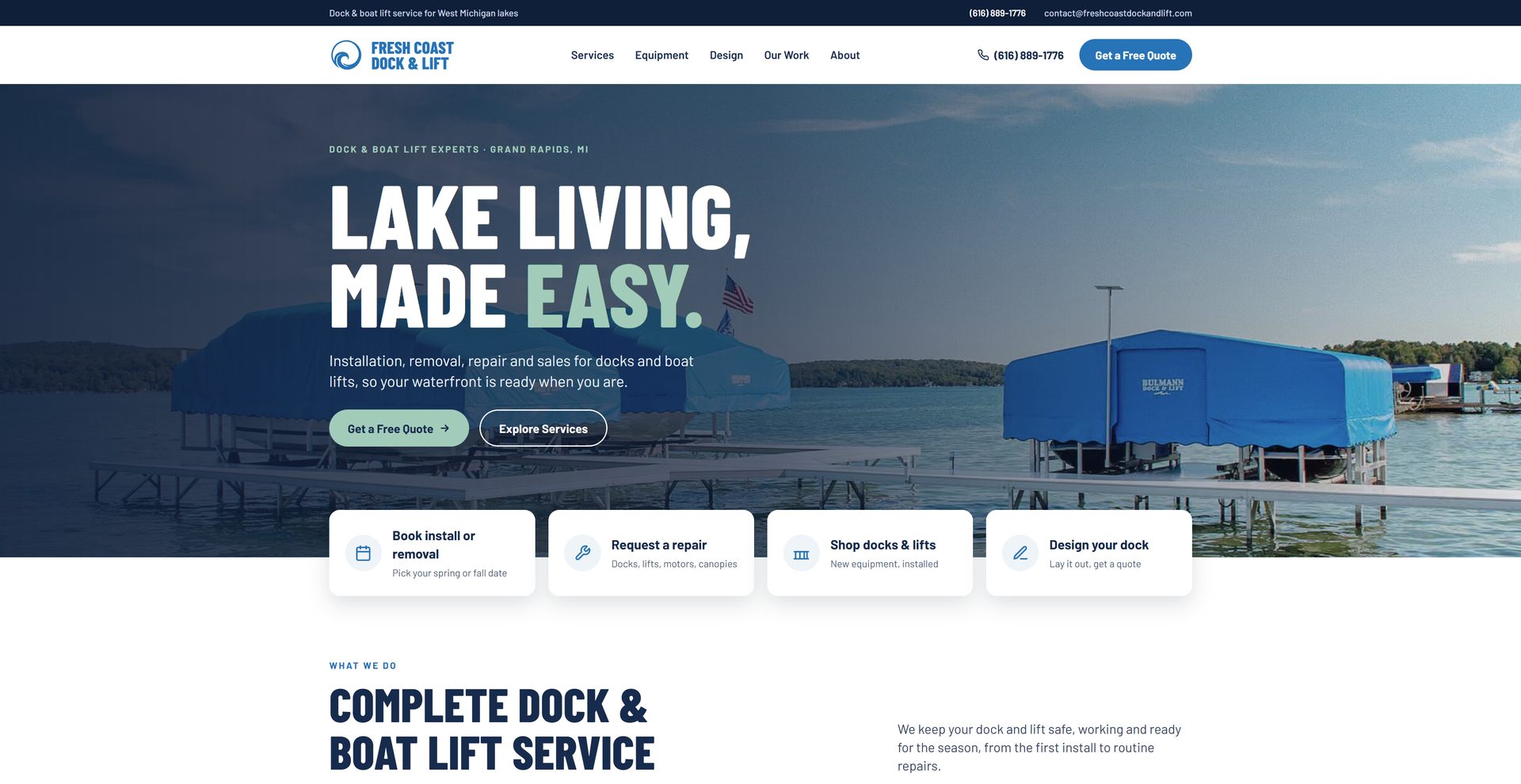
I rebuilt Fresh Coast Dock & Lift’s website from a half-finished Next.js project into a fast, editable marketing site, now live at freshcoastdockandlift.com. It has a page for each service, a quote form that emails leads with attachments, and a browser-based dock designer that lets homeowners lay out their dock and send the parts list with a quote request. I directed an AI coding agent through the build. I owned the product, design and architecture decisions, and I reviewed and tested every change.
The problem
Fresh Coast installs, repairs and moves docks and boat lifts on West Michigan lakes. Before this project, they had an older site and a partly built Next.js rewrite:
- a rough Figma file
- a drag-and-drop dock builder backed by Supabase
- content hard-coded throughout the components
The owner couldn’t change anything without a developer. Adding a dock piece to the builder meant a database edit, and the site did little for search.
The goals for v1:
- Look like a trustworthy local business: clear services, a phone number everywhere, and a quote form one tap away.
- Let the owner run it herself: text, photos, reviews, services and dock pieces, all without a developer.
- Turn the dock builder into a real lead tool, instead of a demo.
- Get found: give each service its own searchable page.
What I built
- A new visual design. Full-bleed lake photography, bold condensed type and a palette pulled from the logo. It’s responsive from 320px phones to wide desktops.
- Sanity CMS for all content. Every page’s text and photos, services, reviews, FAQs, the gallery, dock designer pieces and Google titles and descriptions are editable in a custom Studio.
- Service pages built for search. Each service has its own page with structured data (Service and BreadcrumbList), its own title and description, and a canonical URL, and all of them are listed in the sitemap.
- A rebuilt dock designer.
- Tap or drag pieces onto a 60 ft grid of water, then rotate, copy and remove them.
- Works with touch and keyboard, and has a full-screen mode.
- Checkbox extras (remotes, ladders) with quantities.
- Designs save automatically, can be shared by link, and download as a picture.
- One click sends the design with a quote request.
- A quote pipeline.
- Requests are emailed through Resend, with the customer’s details, a parts list rebuilt on the server, a link that reopens the design, and a picture of the layout attached.
- A spam trap filters bots.
- A thank-you page lets analytics count quote requests.
- Launch tooling.
- Owner-facing switches to hide unfinished features (like the membership page) and every link to them, so launch didn’t have to wait on them.
- A plain-language privacy page, analytics, and a written editing guide for the client.
Design
I gave the agent a set of style-reference and competitor sites plus the Figma file. It came back with several design directions side by side on one comparison page. I picked the bolder option: full-bleed photos, uppercase condensed headlines, color-blocked sections and pill buttons. It felt the most like the company, a crew on the water rather than a corporate brochure.
From there, I reviewed the build in the browser and sent back specific fixes:
- a strip of dead space beside the designer grid
- selected pieces that didn’t visibly highlight
- a stray horizontal scrollbar
- an email address that wrapped mid-word on phones
- an off-center “×” on the FAQ toggle
Small things, but that level of finish is what makes a small-business site feel professional.
Content management: Sanity instead of a database
The original builder kept its dock pieces in Supabase. I switched everything to Sanity, a hosted content system:
- One place to edit. Pages, photos and dock pieces all live in one Studio, so the owner doesn’t have to learn two tools.
- No redeploys. The site reads Sanity’s API on the server and refreshes about once a minute, so edits go live without a rebuild.
- The site never goes blank. Every content loader falls back to built-in copy if Sanity is unreachable, and empty lists (no reviews yet) simply hide their section.
- The Studio is shaped around the owner, not the data model. It uses single-page documents for things like “Site settings” and “About page”, plain-English field help, length warnings on Google titles, and toggles like “Show the dock designer”.
I wrote a short editing guide covering how to publish, where each section of the site is edited, photo and alt-text tips, and an off-site SEO checklist centered on the Google Business Profile.
The dock designer
This is the most distinctive part of the site, and it got a full rebuild.
Architecture. The designer’s logic lives in one pure TypeScript module: placement, collision-free spot finding, the parts list, and encoding designs for links. It has no browser or React code, so the same code runs in the browser and in the quote API. When a customer sends a design, the server doesn’t trust the parts list the browser sends. It unpacks the layout and rebuilds the list from the live product catalog.
Sharing and saving.
- Designs are packed into a compact, versioned format.
- It’s stored in the browser and in a base64url fragment for share links.
- When the grid widened from 50 to 60 ft, old designs and links were migrated automatically, so they stay centered.
- Pieces that were discontinued since a design was saved are removed, with a notice.
Interaction.
- Pointer events handle mouse and touch the same way.
- The grid sizes to fit the screen and only scrolls sideways on narrow phones.
- Full-screen mode fits the full 60 ft width and about 50 ft of water on desktop. On phones it fills the width and suggests turning the phone sideways.
- Corner pieces render as rotatable triangles.
Catalog in the CMS. In Sanity, each product is set as either a piece placed on the grid (with size, shape and color) or a checkbox extra (with an optional quantity). The owner can add a new lift size in a minute.
Search and launch details
- A page per service with descriptive URLs. I renamed them to keyword-rich slugs before launch, with permanent redirects from the old ones.
- Google titles and descriptions for every page are editable in Sanity, with sensible defaults.
- There’s a canonical www domain, and the sitemap and robots file are generated from live content, so hidden pages stay out.
- Open Graph and Twitter images: each service page uses its own photo, and the business can set a default share image.
- LocalBusiness structured data site-wide.
Working with an AI coding agent
I built this with Claude working as a coding agent. It could write files into my repository, run type checks in its own workspace, and drive a browser against my local dev server. It had no shell on my machine, so I ran installs, builds and deploys. I treated it like a fast, capable junior-to-mid engineer who needs clear direction and review.
What I owned:
- Product decisions. For example:
- Moving from Supabase to a CMS.
- Keeping the triangle corner pieces.
- Hiding the unfinished membership offer until it’s ready.
- Design direction, by picking between the options the agent laid out and specifying the details.
- Scope and sequencing. I asked the agent for options with effort estimates, then chose. Examples: fit-to-screen sizing over full zoom controls, and a simple extras checklist over add-ons tied to individual lifts.
- Review. I tested every change myself and reported regressions with screenshots.
What made the collaboration work:
- Verification before “done”. The agent checked each change against the running site with scripted browser checks, measuring layouts at 320 to 1440px widths, testing the designer’s interactions, and sending a real test quote through Resend and confirming it landed in my inbox. That caught problems like a React StrictMode double-load that stopped share links from opening.
- Honest gap reports. When something couldn’t be verified, it said so. One example was the extras checklist, which it couldn’t see until real extras existed in the CMS.
- Guardrails. It never touched credentials or created accounts. I added API keys and environment variables myself, and it walked me through each one.
- Written state. A running plan document in the project kept decisions and open items straight across sessions.
What I’d do differently: set up a preview deployment with the CMS connected on day one. One bug, the preview site silently showing fallback content because its CMS settings were missing, only showed up late. It’s now handled in code with a safe default.
Results
- The site launched on September 28, 2026, at freshcoastdockandlift.com.
- The owner updates her whole site without a developer.
- Every service has its own page for search.
- Leads arrive as organized emails, with dock designs attached when the customer made one.
- The dock designer went from a database-backed demo to a lead tool the owner controls.
- Unfinished features can be switched on from the CMS when they’re ready, with no code change.
Next up: Google Search Console and Business Profile setup, and collecting real customer reviews.
Tech stack
- Next.js 14 (App Router)
- React 18
- TypeScript
- Tailwind CSS
- Sanity CMS
- GROQ
- Vercel
- Vercel Analytics
- Resend
- Canvas API
- Pointer Events
- Schema.org structured data
- Figma
- Claude (AI coding agent)
Want something like this built?
Get in touch